
Digital technology has transformed retail, first online and now, increasingly, in physical stores. One of the most powerful tools in this transformation is retail digital signage—dynamic displays inside and outside stores that help draw foot traffic inside, influence buying decisions, communicate the brand story and can even help streamline operations.
Unlike static posters or printed signs, these connected displays can update in real time and create interactive experiences. When implemented strategically, retail digital signage is more than a dynamic billboard—it’s a powerful communication channel, helping retailers capture attention, deepen engagement, drive sales and transform physical locations into immersive brand environments.
In this guide, we’ll break down everything you need to know about retail digital signage: what it is, how it works, the different types available, key benefits and the trends shaping its future. Let’s dive in.
- What is retail digital signage?
- How does it work?
- Components of a digital signage system
- Types of digital signage in retail
- Indoor vs outdoor signage
- Key features of retail digital signage software
- Key benefits of digital signage in retail
- Retail digital signage strategy and implementation
- Emerging trends in retail digital signage
Meet the new era of commerce
Omnichannel retail puts the customer at the center of the shopping experience, giving them a seamless experience on multiple interconnected channels. Find out how to take your new retail store into the future.
What is retail digital signage?
Retail digital signage refers to networked digital displays used in retail environments—from storefront windows to smart mirrors—to deliver dynamic content such as promotions, product education, wayfinding and brand storytelling.
Unlike static posters or printed signs, digital signage in retail can display:
- video and motion graphics
- live pricing or inventory data
- interactive content
- context-aware messaging based on time, location or audience
Think of it as the modern equivalent of the traditional chalkboard—only it’s flexible, centrally managed and responsive to real-time conditions. From a screen at the entrance highlighting current campaigns to an interactive kiosk helping customers locate products, retail digital signage supports discovery, decision-making and improves conversion throughout the store.
How does digital signage work?
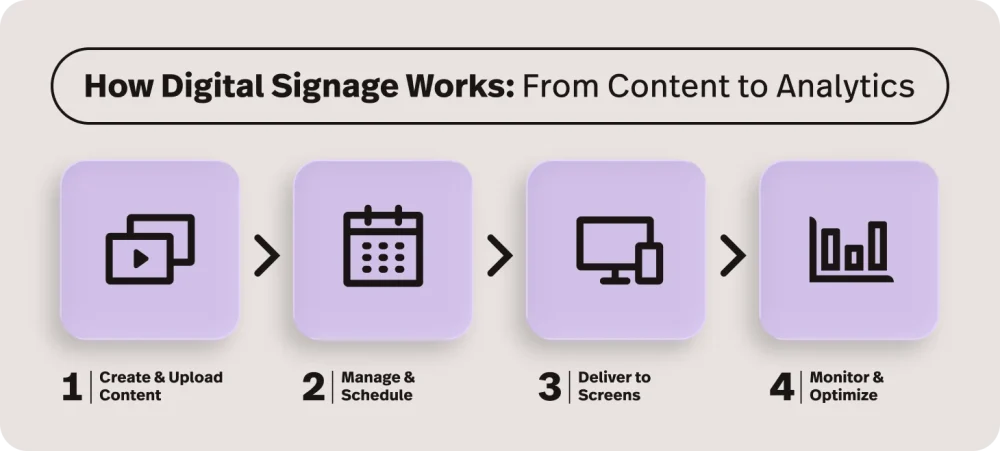
Retail digital signage works as a connected ecosystem, bringing together hardware, software, content and data to deliver dynamic in-store experiences. The CMS acts like the command center—letting retailers upload, schedule and monitor content across screens without manually changing signage at each location.
Here’s how the pieces fit together:
Hardware
This includes the physical displays (LCD, LED, video walls, kiosks, etc.) and the media players that power them. Media players—or built-in system-on-chip technology—store and render content on each screen. Commercial-grade hardware is built for long runtimes, higher brightness and retail durability.
Software
The content management system (CMS) is the control center. It allows teams to upload assets, build playlists, schedule campaigns and manage screens across locations. From one dashboard, retailers control what plays, where and when.
Content
Content can include images, video, HTML layouts, promotions and live data feeds. It may be scheduled in advance or triggered dynamically based on time, location or business rules. Clear, compelling content is what turns digital signage into a revenue-driving channel.
Connectivity and networking
Wi-Fi, Ethernet or cellular connections link screens to the CMS. This enables real-time updates, remote troubleshooting and centralized control, eliminating the need for manual in-store changes.
Integration with other technologies
Integrations connect retail digital signage with POS, inventory, loyalty and ecommerce systems. This allows displays to surface live pricing, inventory-aware promotions or omnichannel messaging, transforming signage into a responsive extension of your retail tech stack.
Components of a retail digital signage system
A retail digital signage ecosystem includes several core components, including:
- displays
- media players
- Content Management System (CMS)
- content and data
Displays
Commercial‑grade LCD or LED screens, video walls, shelf‑edge displays, kiosks or outdoor totems. These are designed for long runtimes, higher brightness and durability.
Media players
Small dedicated devices (or system‑on‑chip modules built into some displays) that connect to the screen and the network. They store content locally, follow schedules and output video and audio.
Content Management System (CMS)
The software “brain” where you upload, organize and schedule content. Most modern CMS platforms are cloud‑based, with web dashboards and granular control by location, device or user role.
Content and data
Media assets, templates and real-time data from POS systems, inventory, weather services or loyalty platforms. These data feeds enable contextual, automated content.
Together, these components form a flexible platform that can scale from a single screen in a boutique to thousands of screens across regions.
Types of digital signage in retail
Retailers use digital signage in many formats and locations to support the full customer journey. Here are some of the most common:
Window displays
View this post on Instagram
Large screens or LED walls at store entrances or in windows to attract foot traffic, highlight campaigns and convey brand personality.
In-store digital displays
Wall‑mounted or gondola‑top displays in key categories (beauty, electronics, sporting goods, grocery, etc.) for feature products, promos and brand storytelling.
Queue and checkout displays
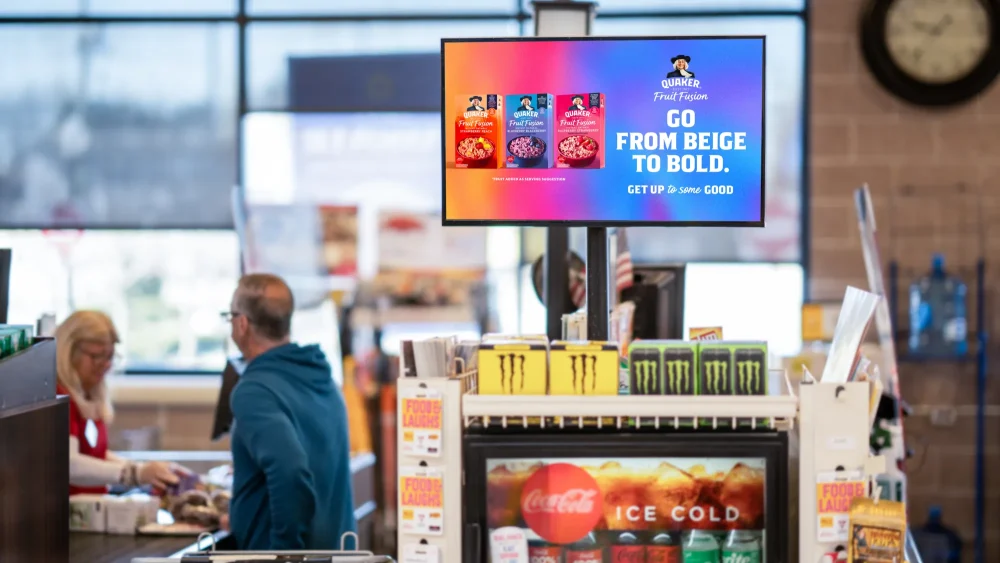
Screens near checkout and pick‑up counters to reduce perceived wait time, promote add‑ons and reinforce loyalty and omnichannel options.
Video walls and LED displays
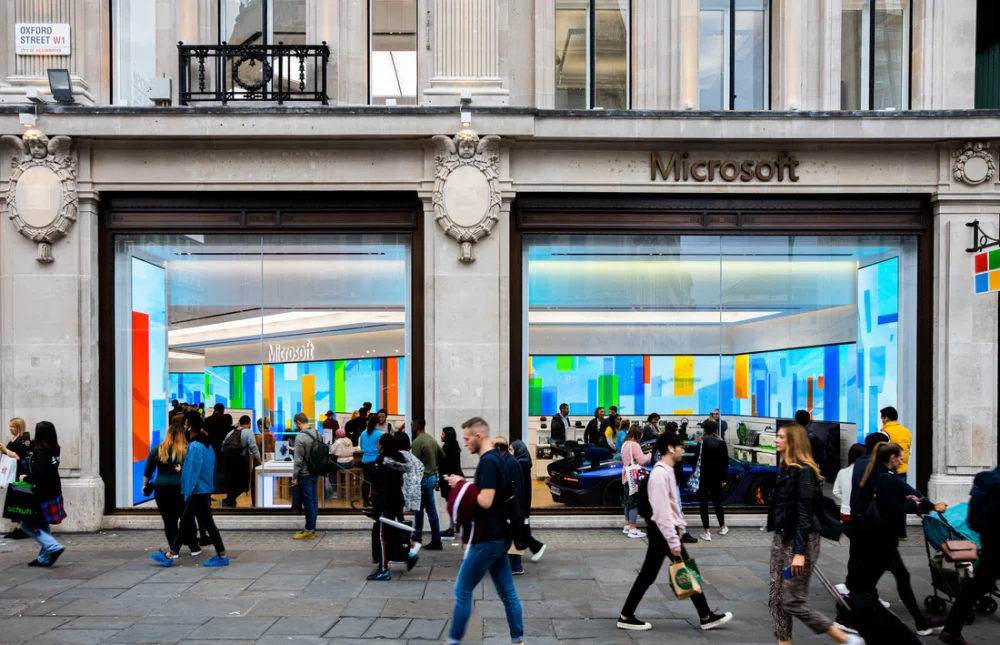
High-impact, large-format displays made up of multiple panels or direct-view LED modules. Often used in flagship locations to create immersive experiences, launch campaigns or showcase premium content.
Digital menu boards
Used heavily in quick-service restaurants, cafés and grocery food courts to display menus, prices and combos that can be updated instantly across locations.
Interactive touchscreens and kiosks

Touchscreen kiosks for product lookup, endless aisle browsing, store navigation, education or entertainment.
Self-service and checkout kiosks
Standalone stations that allow customers to place orders, complete purchases or arrange pickup without staff assistance—helping reduce lines, increase efficiency and reduce staff workload.
Wayfinding and directory displays
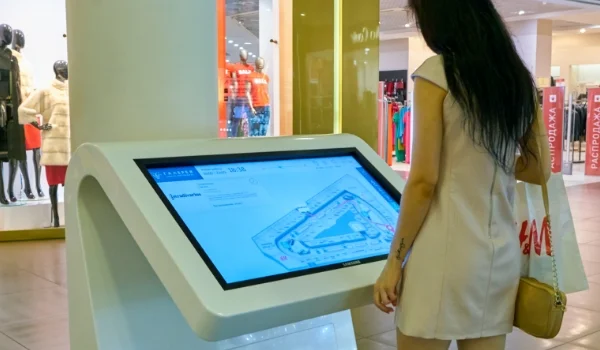
Digital maps or store directories that guide shoppers to departments, specific products, services or events—particularly useful in large stores, malls or multi-level retail spaces.
Shelf‑edge and end-cap displays
Small screens attached directly to shelves or fixtures to show prices, promos, ratings or product education at the exact decision point. Foundational to the dynamic pricing framework.
Smart mirrors
Augmented reality mirrors in fitting rooms or display areas that let shoppers virtually try on clothes, see product details or get styling suggestions triggered by RFID tags or touch.
Many retailers combine multiple types of digital signage to create a cohesive experience from entry to checkout.
Indoor vs outdoor retail digital signage
Indoor and outdoor digital signage share the same core principles but differ substantially in hardware, content strategy and cost.
Indoor digital signage
Indoor screens operate in controlled environments with relatively stable temperature and lighting. This allows for:
- standard commercial LCDs or LED panels with moderate to high brightness
- more detailed content, since viewers are often closer to the screen
- lower hardware and installation costs compared with outdoor digital signage
- higher density of screens throughout the store
Indoor use is ideal for promotions, education, guided selling and brand storytelling.
Outdoor digital signage
Outdoor digital signage has to contend with:
- high brightness and direct sunlight
- weatherproofing against rain, dust, temperature extremes and vandalism
- longer viewing distances and distracted viewers
As a result, outdoor displays tend to be more rugged and expensive but can deliver strong impact by capturing traffic outside the store. Content needs to be bold, legible at a distance and quickly understandable.
Key features of retail digital signage software
The software layer is what makes retail digital signage manageable at scale. Key capabilities to look for include:
Cloud-based content management
Cloud-based content management systems eliminate the need for in-store manual updates and allow centralized control across your network, so you can update your content from anywhere you are.
Playlist and scheduling control
Create time, date or event-based playlists and schedule content by screen, zone, store, region or time of day, ensuring the right message appears in the right place at the right time.
Support for multiple content formats
Support for images, video, HTML, live data feeds, social media integrations and interactive elements like QR codes or touch functionality. Flexibility in formats allows for richer, more engaging displays.
Interactive and touch capabilities
Touchscreen interfaces use proximity sensors to create engaging environments where customers can explore products, browse inventory or access additional information independently.
POS, inventory, and social media integrations
APIs and native integrations connect signage with POS, inventory, pricing, loyalty or external data sources (like weather or traffic). These integrations power dynamic, inventory-aware and context-aware messaging.
A strong digital signage software platform keeps retail digital signage agile, data-driven and easy to manage, ensuring it supports both operational efficiency and revenue growth.
Key benefits of digital signage in retail
When executed well, retail digital signage can deliver measurable benefits across CX, operations and revenue performance. It’s not just about modernizing your store—it’s about improving how shoppers move, decide and buy.
Boost sales and impulse purchases
Motion, video and context-aware messaging naturally attract more attention than static signage. Well-placed screens can drive impulse buys, highlight higher-margin products and encourage trade-ups at key decision points.
Higher shopper engagement and dwell time
Dynamic displays capture interest and encourage customers to spend more time in-store. Increased dwell time often correlates with higher conversion rates and larger baskets.
Enhance in-store experience and wayfinding
Strategically placed screens help customers navigate the store and make confident decisions. From digital directories to displays in high-consideration categories, retail digital signage elevates the customer experience and delivers helpful product information where and when it’s needed.
Reduce printing costs and boost operational efficiency
Digital updates eliminate recurring print runs and manual sign swaps. Centralized control minimizes pricing errors and ensures consistent messaging across locations.
Improved price and promo accuracy
When connected to POS and inventory systems, retail digital signage helps keep offers aligned with real-time pricing and stock levels, reducing customer frustration and staff rework.
Strengthen brand experience and recall
Dynamic storytelling, video and immersive displays elevate brand perception, reinforce positioning and make campaigns more memorable.
Enhanced omnichannel experience
In-store screens can promote app downloads, loyalty enrollment, and even boost social media engagement, reinforcing the connection between your digital and physical channels.
Not every benefit will apply equally to every retailer, but even modest deployments often generate measurable lift when aligned with clear objectives.
Retail digital signage strategy and implementation
Getting started with retail digital signage involves more than just choosing hardware. To move from concept to impact, retailers need a clear strategy and defined KPIs.
Here’s how to get started:
1. Align signage with brand and store goals
Before you start shopping around for hardware, define your objectives. Is the goal to:
- increase foot traffic?
- increase category sales or basket size?
- boost loyalty sign‑ups or social media engagement?
- reduce printing costs or pricing errors?
Use these objectives to guide screen placement, content strategy and how you’ll measure impact.
2. Improve the customer experience
The best retail signage doesn’t feel like an advertisement; it feels like a service. When done well, it removes friction, answers questions and guides shoppers naturally through the store. That starts with mapping the customer journey and identifying where digital touchpoints can genuinely add value.
Your frontline staff will offer the most valuable insights. They see where customers hesitate, ask repeated questions or abandon purchases. Talk to associates to uncover common friction points—whether it’s confusion around pricing, difficulty finding products or long wait times.
Use retail digital signage strategically in those moments to inform, reassure and streamline the experience rather than just pushing promotions.
3. Scalability and budget considerations
You don’t need fifty screens on day one. Start with high-impact zones like the entrance, fitting rooms, category hotspots, checkout and/or customer service desk, then scale as you see the results.
Of course, taking your signage from a single pilot screen to a full-store or multi-store network requires a solid plan. Given that retail digital signage succeeds or fails on content quality, you’ll want to start by establishing a content governance model.
Define:
- who owns which screens and zones (head office vs regions vs stores)
- cadence for updating promos and brand content
- content standards (length, readability, motion, accessibility, etc.)
- approval workflows and asset libraries
Be sure to plan for both campaign content and evergreen filler, so you can avoid the “blue screen of death” that can undermine the customer experience.
Once you’ve got your plan in place, you can start shopping around for technology partners. When choosing a platform or integration, consider:
- hardware and software compatibility
- ease of use for non‑technical staff
- integration options with existing systems
- support, service level agreement (SLA) and lifecycle management
- total cost of ownership
If you plan to integrate your digital signage technology with your POS—which will enable you to sync your digital signage with real-time pricing, inventory and sales data—find out what digital signage software integrates with your POS.
Alternatively, if your POS offers access to an open API—such as Lightspeed Retail—you can integrate third-party digital signage platforms directly with your system, or use a tool like Zapier to connect the two solutions.
Retail digital signage trends
AI-powered personalization
Retail digital signage is becoming more data-driven. AI can adjust content based on traffic patterns, time of day, weather or inventory.
Some systems use anonymized facial analysis to estimate age range, gender, emotion or dwell time from several meters away, allowing screens to adjust messaging accordingly—for example, promoting trend-focused apparel to younger shoppers or family-oriented content to groups with children.
When integrated with loyalty programs and mobile apps, retailers can also deliver personalized offers and recommendations, resulting in more relevant engagement and higher-impact moments in store.
Interactive and touchless experiences
Interactive and touchless solutions turn retail digital signage into a service layer rather than just an ad surface.
For example:
- Touchscreen kiosks enable wayfinding, product exploration, inventory checks, self‑ordering and self‑checkout, often integrated with POS and payment devices.
- Voice input, sensor‑based “lift & learn,” RFID and proximity triggers fire content when a shopper picks up a product or walks into a zone.
- QR codes and mobile integration connect displays to shoppers’ smartphones for instant access to promotions, product details, reviews or loyalty offers.
- Augmented Reality (AR) experiences enable customers to virtually try on products or visualize items—like furniture or décor—in their own space before buying.
Data-driven content and analytics
Analytics tools remove the guesswork from decision-making and turn retail digital signage into a measurable performance channel. For example:
- Footfall tracking and heat‑mapping reveal high‑traffic zones, helping retailers place screens where they’ll have the greatest impact.
- Digital signage analytics can link specific creatives to engagement and sales.
- A/B testing of messages, layouts and locations allows retailers to refine content based on real performance.
AI-powered content optimization takes this a step further; displays can automatically surface the most relevant promotions based on live store activity, inventory levels or recent purchasing trends.
Sustainability and energy-efficient displays
Sustainability is increasingly becoming a core design constraint for signage networks. Today’s commercial LED and LCD displays are designed for lower power consumption and can be paired with features like auto-dimming and smart scheduling so retailers can run dynamic campaigns and timely promotions without significantly increasing electricity costs.
Digital signage also reduces reliance on printed posters and flyers, helping cut paper waste and recurring production expenses—a meaningful step toward meeting sustainability goals. For outdoor environments, solar-assisted or low-energy LED solutions can improve efficiency while maintaining strong visibility.
Longer‑life, higher‑quality displays also mean fewer replacements and less waste, aligning digital signage investments with broader environmental, social and governance (ESG) and cost‑reduction goals.
Integration with omnichannel retail strategies
The most effective retail digital signage solutions are integrated into your broader omnichannel retail strategy, reinforcing messaging across online and in-store touchpoints. That could look like:
- Ecommerce and social media synchronization: Feature trending products, online-only promotions or user-generated content directly on in-store screens to bridge digital discovery and physical purchase.
- Inventory-aware messaging: Adjust on-screen promotions and recommendations based on real-time stock levels or demand, helping prevent overselling and spotlighting what’s available now.
- Consistent brand storytelling: Align in-store displays with the campaigns and messaging customers see across email, web and social channels to create a seamless, recognizable brand experience.
When retail digital signage is connected to your broader commerce ecosystem, it strengthens continuity across channels—building brand recognition, trust and long-term loyalty.
Learn more about how modern technology is reshaping the in-store experience.
The bottom line
Retail digital signage is most powerful when it’s integrated with the systems that run your business. When your screens are fueled by real-time pricing, inventory and customer data, they become more than displays. They become a strategic channel for driving sales, reinforcing your brand identity and delivering seamless omnichannel experiences.
With an API-enabled platform like Lightspeed Retail, you can connect third-party digital signage tools to your POS, inventory and loyalty data—unlocking dynamic promotions, accurate pricing and smarter in-store messaging.
Ready to power more connected retail experiences? Speak with a Lightspeed POS expert today.
FAQs
How much does digital signage cost?
Retail digital signage costs vary by size and complexity. A commercial screen may range from $1,000–$2,500, media players from $150–$800 and cloud CMS software from $10–$30 per screen per month. Larger networks can scale significantly higher depending on scope.
How does digital signage work in retail stores?
Content is uploaded to a CMS, scheduled and distributed to media players connected to displays. The system monitors playback and can integrate with POS or inventory data.
What are the main types of digital signage used in retail?
The main types of digital signage used in retail include window displays, in-aisle displays, video walls, digital menu boards, self-service and checkout kiosks, wayfinding screens, shelf-edge displays and smart mirrors.
What are the benefits of digital signage in retail?
There are a number of benefits of digital signage in retail, including higher customer engagement via motion/video, higher conversions and dwell times, better customer experience, instant updates at scale, better price accuracy, lower printing costs and enhanced omnichannel support.
What software is used for retail digital signage?
Cloud CMS platforms like Raydiant, ScreenCloud or OptiSigns manage content upload, scheduling, device monitoring, data integrations and analytics.
What are the latest retail digital signage trends?
Emerging trends in retail digital signage include AI personalization, touchless interactivity, analytics-driven optimization, energy-efficient displays and deeper omnichannel integration.

News you care about. Tips you can use.
Everything your business needs to grow, delivered straight to your inbox.